M2A Cloudwatch Metrics (local)
Download OpenAPI specification:
Cloudwatch Metrics pairs up with the Templates Service to serve up cool graphs that'll provide insight into the current and historic state of the underlying AWS resources that make M2A's services go.
Render Cloudwatch metric widget images from templates registered with the m2a-templates-api service.
Render a templated Cloudwatch Metric Widget Image
Render a Cloudwatch Metric Widget Image based on a predefined query template.
A jinja template of service type: METRICS must be registered to the m2a-templates-api with the appropriate placeholder keys (start, end, height, width), along with placeholder keys for any resources that are being monitored.
Placeholder keys for resources are the plural of the resource name (i.e. caches, encoders, packagers, sources, computers) followed by a list of the resource responses for all resources of that type from that resource's GET API endpoint. e.g. a placeholder method within the template could be {{for encoder in encoders}} {{encoder.data.attributes.channel.aws.arn}}.
See the POST template API reference for details on how to build and create a METRICS template.
Example template:
{
  "metrics": [
    {% set comma = joiner(",") %}
    {% for packager in packagers %}
      {{ comma() }}
      {% set region = packager['channel']['arn'].split(':')[3] %}
      {% set packager_id_suffix_safe = '_' + packager['id'].split('-') | join('_') %}
      [
        {
          "expression": "bytes{{packager_id_suffix_safe}} * 8 / PERIOD(bytesRaw{{packager_id_suffix_safe}})",
          "id": "bitRate{{packager_id_suffix_safe}}",
          "color": "#08aad2",
          "label": "{{packager.channel.id}}"
        }
      ],
      [
        {
          "expression": "FILL(bytesRaw{{packager_id_suffix_safe}}, 0)",
          "id": "bytes{{packager_id_suffix_safe}}",
          "visible": false
        }
      ],
      [
        "AWS/MediaPackage", "EgressBytes", "Channel", "{{packager.channel.id}}",
        {
          "id": "bytesRaw{{packager_id_suffix_safe}}",
          "visible": false,
          "stat": "Sum",
          "region": "{{region}}"
        }
      ]
    {% endfor %}
  ],
  "view": "timeSeries",
  "width": {{width}},
  "height": {{height}},
  "period": 60,
  "title": "Channel Throughput",
  "theme": "dark",
  "start": "{{start}}",
  "end": "{{end}}",
  "yAxis": {
    "left": {
      "min": 0,
      "showUnits": false,
      "label": "Bitrate (bps)"
    }
  },
  "legend": {
    "position": "bottom"
  }
}
Example image:
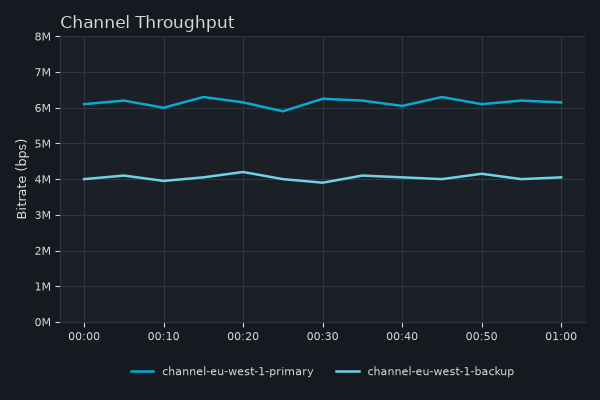
See example query to make into templates in the AWS Cloudwatch Get Metric Widget Image API documentation: https://docs.aws.amazon.com/AmazonCloudWatch/latest/APIReference/API_GetMetricWidgetImage.html
Authorizations:
query Parameters
| owner-id required | string <uuid> Owner of the resources being monitored (the target account ID) |
| template-name required | string Name of the template |
| resource required | Array of strings [ 1 .. 100 ] items [ items^[0-9a-f]{8}-[0-9a-f]{4}-[0-9a-f]{4}-[0-9a-f]... ] List of resources formed of the ID of resource to monitor and its type separated by a colon. Format: |
| start | string Default: "-PT1H" Start of the time window shown in the metric graph. Provide either an absolute point in time as an ISO 8601 datetime (e.g., 2018-04-25T12:00:00.000Z) or a relative offset back from "now" as an ISO 8601 duration (e.g., -PT3H for three hours ago). Defaults to -PT1H (one hour ago) if not provided. |
| end | string End of the time window shown in the metric graph. Provide either an absolute point in time as an ISO 8601 datetime (e.g., 2018-04-25T12:00:00.000Z) or a relative offset back from "now" as an ISO 8601 duration (e.g., -PT1H for one hour ago). Required when |
| height required | integer [ 1 .. 2000 ] Height of the returned image in pixels. Must be between 1 and 2000 inclusive, as enforced by the AWS Cloudwatch GetMetricWidgetImage API. |
| width required | integer [ 1 .. 2000 ] Width of the returned image in pixels. Must be between 1 and 2000 inclusive, as enforced by the AWS Cloudwatch GetMetricWidgetImage API. |
header Parameters
| Accept required | string Value: "image/png" Example: image/png Content type (expressed as MIME types) the client is able to understand. |
Responses
Response samples
- 401
- 403
- 404
- 422
- 500
{- "error": "No identity found in request"
}Return Cloudwatch time series data plus the rendering metadata a client needs to draw its own charts, from templates registered with the m2a-templates-api service.
Return chart-ready Cloudwatch time series data
Fetch the time series for one or more metric charts and return each chart
together with the metadata a client needs to draw it — series values and
labels, units, axis binding, chart type, colours, and threshold
annotations.
Each requested template is a METRIC_DATA
template registered with the m2a-templates-api service that describes one
chart: the metrics to query and how the chart should be presented. The
service renders every requested template against the supplied resources,
resolves the time window, and issues a single batched AWS GetMetricData
call covering all of them; the results are split back out and returned as
an ordered charts array, one entry per template.
Resolution.
The granularity of the returned data is derived from the time window and the
resource family: it is the coarsest of the retention floor for the window
start (Cloudwatch retains older data only at coarser resolution), the
granularity the family's metrics are published at (Cloudfront cache metrics
are published once a minute, so cache charts are never finer than 60s;
MediaConnect source metrics are published every second) and the
render-budget ceiling (max-render-points), snapped to a valid Cloudwatch
period. The value
actually used is returned in meta.effectivePeriod and is the natural
basis for cache TTL. The standard resolutions periods that may be
snapped to are 1, 5, 10, 20, 30, 60, 120, 300, 600, 900, 1800, 3600, 7200,
21600 seconds. The service always returns the finest period that works for
the requested window and render budget, so the client can always render and
label the data correctly.
Render budget. The max-render-points
parameter is a per-series render budget: the maximum number of datapoints
returned per series. The service caps datapoints by promoting the period
so that at most this many points (snapped to a valid Cloudwatch period) are returned.
The default is 1440 — one day of data at a 60s period — which is also the maximum.
A smaller value can be supplied for a lighter payload.
Partial results. A single failed template
or unresolvable resource returns a per-chart error while the request as a
whole still returns 200. A template that resolves but has no datapoints in
the window returns a valid empty chart, not an error.
Authorizations:
query Parameters
| owner-id required | string <uuid> Owner of the resources being monitored (the target account ID) |
| templates required | Array of strings non-empty [ items non-empty ] Comma-separated list of |
| resources required | Array of strings non-empty [ items^(?:cache|encoder|packager|source|computer):[... ] Example: resources=source:23bb15d0-f458-4d36-b29e-8958d0830226,source:4a553a18-f22c-4b0f-b7e8-e1b8228a3176 Comma-separated list of resources to monitor, each formed of its type and the resource ID (UUID) separated by a colon. Format: |
| range | string <duration> Default: "PT1H" Relative time window ending at the current time, given as an ISO 8601 duration (e.g., PT3H for the last three hours). This is the default way to request a window and the natural fit for preset ranges and live refresh. Ignored when an absolute |
| start | string <date-time> ^\d{4}-\d{2}-\d{2}T\d{2}:\d{2}:\d{2}(Z|[+-]\d... Example: start=2026-01-20T00:00:00Z Absolute start of the time window, as an ISO 8601 datetime to seconds accuracy with a timezone designator — either |
| end | string <date-time> ^\d{4}-\d{2}-\d{2}T\d{2}:\d{2}:\d{2}(Z|[+-]\d... Example: end=2026-01-20T01:00:00Z Absolute end of the time window, as an ISO 8601 datetime to seconds accuracy with a timezone designator — either |
| period | integer [ 1 .. 86400 ] Example: period=60 Optional explicit period (resolution) in seconds. Legal values are 1, 5, 10, 20, 30, 60, or any whole multiple of 60; values below 60 are only available for high-resolution metrics. When omitted, the service chooses a period automatically from the requested window, the resource family and the render budget. A requested period is subject to two floors: Cloudwatch retains older data only at coarser resolution, so a fine period cannot be served for a window that reaches far into the past; and a period finer than the resource family's metrics are published at has nothing behind it (Cloudfront cache metrics are published once a minute, so 60 is the finest period a cache request can ask for; MediaConnect source metrics are published every second). A family whose publisher granularity is not declared, which today is every family except caches and sources, takes the one-minute standard-resolution floor, because AWS services publish standard-resolution metrics unless they document otherwise. A period below either floor is rejected with a |
| max-render-points | integer [ 1 .. 1440 ] Default: 1440 Optional per-series render budget: the maximum number of datapoints returned per series. The service caps datapoints by promoting the period so that at most this many points (snapped to a valid Cloudwatch period) are returned. Defaults to 1440 — one day of data at a 60s period — which is also the maximum. Supply a smaller value for a lighter payload. Echoed back in |
header Parameters
| Accept | string Example: application/json Content types the client is able to understand. This endpoint serves JSON time series data and nothing else, so the header is a preference rather than a value that must match: it is negotiated as HTTP defines, across the whole weighted list of media ranges. Sending no header, |
Responses
Response samples
- 200
- 401
- 403
- 404
- 406
- 422
- 500
{- "meta": {
- "start": "2019-08-24T14:15:22Z",
- "end": "2019-08-24T14:15:22Z",
- "effectivePeriod": 0,
- "bindingConstraint": "retention",
- "maxRenderPointsPerSeries": 0,
- "nextStart": "2019-08-24T14:15:22Z",
- "fetchedAt": "2019-08-24T14:15:22Z",
- "resources": [
- {
- "resource": "string",
- "provisioningStatus": "creation-complete",
- "observedAt": "2019-08-24T14:15:22Z"
}
]
}, - "charts": [
- {
- "template": "string",
- "data": {
- "series": [
- {
- "id": "string",
- "label": "string",
- "timestamps": [
- "2019-08-24T14:15:22Z"
], - "values": [
- 0
], - "yAxis": "left",
- "unit": "string",
- "statusCode": "Complete"
}
], - "rendering": {
- "chartType": "line",
- "yAxis": {
- "left": {
- "label": "string",
- "min": 0,
- "max": 0,
- "showUnits": true
}, - "right": {
- "label": "string",
- "min": 0,
- "max": 0,
- "showUnits": true
}
}, - "annotations": {
- "horizontal": [
- {
- "label": "string",
- "value": 0,
- "yAxis": "left",
- "color": "string"
}
]
}, - "seriesColors": {
- "property1": "string",
- "property2": "string"
}
}
}
}
]
}